Amigurumi 3D Wallpaper
LÒ CHÍ ANHPersonalization
0.00.00 Reviews
- Version
- 1.0
- Installs
- 10.00K
- Age Rating
- Everyone
Screenshots
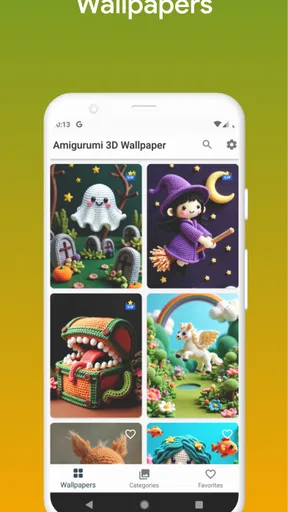
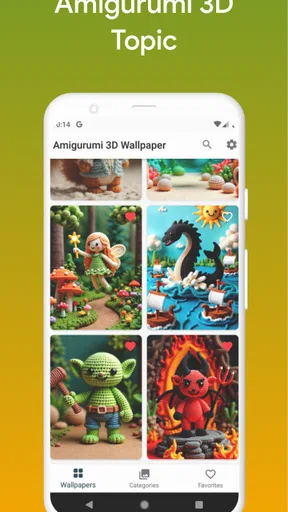
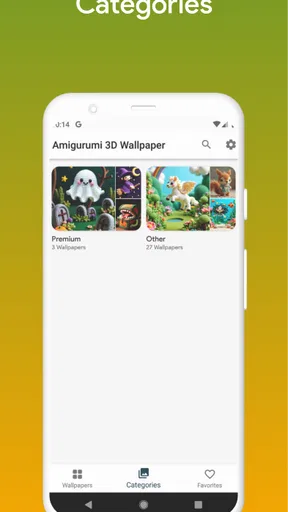
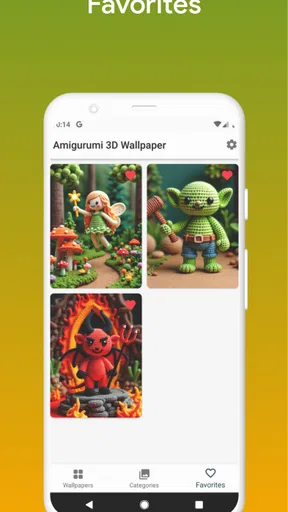
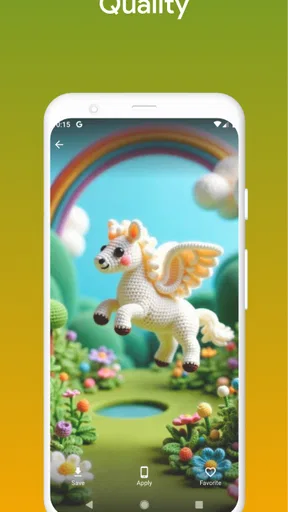
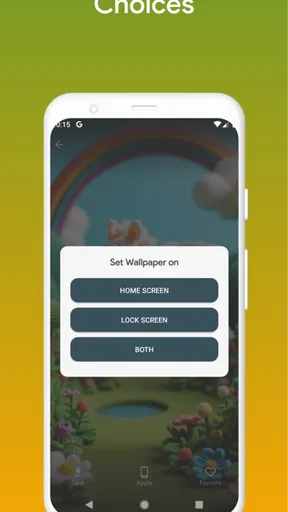
Our Review of Amigurumi 3D Wallpaper
 Analysis by Appyee
I judge a wallpaper app by more than whether its pictures look cute in a preview. The real test is how its style feels when I see it repeatedly throughout an ordinary day, and whether I can live with the visual trade-offs that come with choosing something playful over a clean, neutral screen. Amigurumi 3D Wallpaper has a clear identity: it brings a soft, handmade-looking character aesthetic to phone personalization. That focus is its strongest reason to try it, though it also means this is a niche choice rather than an all-purpose wallpaper library.
It is a free personalization app from developer LÒ CHÍ ANH, with optional in-app purchases priced from around 29 cents to about 20 dollars per item. It is intended for Everyone, and its current version is 1.0, so I would approach it as a focused way to give a compatible phone a distinctive look, not as a mature, endlessly broad customization suite. The release date is November 2, 2025, and it has over 10,000 installs. Those details make it easier to set expectations: the appeal here is the theme and mood, not a promise of a huge catalog or a long record of updates.
What is Amigurumi 3D Wallpaper?
If you're wondering what on earth amigurumi is, it's a Japanese art form of knitting or crocheting small, stuffed yarn creatures. Picture tiny, cuddly characters with beady little eyes, and you've got the idea. Amigurumi 3D Wallpaper takes this concept and brings it into the digital realm, offering a collection of animated, 3D wallpapers that feature these adorable creations.
Why the handmade character look works
The key appeal is the contrast with the photographic landscapes, abstract gradients, and minimalist backgrounds that dominate many wallpaper collections. A yarn-like creature has texture and personality even when it is only a small part of the screen. That makes the app especially suited to someone who wants a phone to feel warm and playful rather than polished or businesslike. I would choose this style for a personal device where a little visual character is welcome; I would think twice before using it on a phone whose screen needs to stay calm and unobtrusive during work.
There is a practical design trade-off behind that charm. A wallpaper shares space with app icons, widgets, and notifications, so a detailed character can either make the screen feel considered or compete with everything placed on top of it. I recommend checking a chosen design against your actual home-screen layout, not just judging it as a full-screen preview. If icons cover the character’s face or the busiest parts of the image, the cute effect may disappear. A simpler layout can give the artwork more room to read.
Features That Will Make You Smile
The app has a variety of features that ensure your screen is always looking fresh and fun. Here's what you can expect:
- Interactive Wallpapers: The wallpapers aren't just static images; they're interactive! Tap on the screen, and watch the little creatures dance around or react in playful ways.
- Customization Options: You can personalize your experience by selecting different characters and backgrounds. Whether you like cats, dogs, or even mythical creatures, there's something for everyone.
- Regular Updates: The app frequently updates its collection, so there's always something new to look forward to.
- Battery Efficient: Despite its 3D animations, the app is optimized to be easy on your battery, ensuring you can enjoy the cuteness without worrying about draining your phone's life.
Making a wallpaper fit real phone use
Interactive movement is the feature I would weigh most carefully. It can turn a quick glance at the home screen into a small moment of amusement, but motion is not automatically a benefit for everyone. If you unlock your phone often while concentrating, a moving background may become visual noise instead of a treat. If you like the idea but are unsure, try it during a normal day rather than deciding from a short preview: notice whether the animation still feels pleasant after repeated checks, and whether it distracts from reading icons or notifications.
One useful way to approach personalization is to settle the layout before settling on the wallpaper. Put the widgets and shortcuts you genuinely use where they belong, then see whether the character remains visible and the screen still feels easy to scan. This avoids the common trap of rearranging a useful home screen around an image you may soon replace. If your phone is already crowded, a less detailed background or a static image may serve you better than an animated scene.
For a realistic everyday example, imagine checking your phone between errands or during a short break. A small animated creature can give those routine unlocks a friendly feel, especially if you enjoy cute handmade art. But if you use the same screen to read work alerts quickly, the animation and character details may compete for attention. I would use the app on a personal home screen where the wallpaper is part of the mood, and switch to a quieter option when legibility or focus matters more.
How it compares with ordinary wallpaper choices
Compared with a standard gallery of static photos, this app’s character-centered 3D presentation is more expressive and potentially more engaging, but it is also less flexible as a background for every taste and situation. A landscape or plain color can fade into the background; a cute figure naturally asks to be noticed. Compared with broad wallpaper apps that emphasize variety across styles, this one makes more sense when you already know you want the amigurumi look. If you are still exploring whether you prefer nature, abstract art, illustrations, or character designs, a general wallpaper collection will probably be a better starting point.
It is also worth separating “customization” from complete home-screen theming. Choosing a character or background can make the wallpaper feel more personal, but it does not automatically mean your icons, widgets, or interface will match. I would treat the image as one part of a setup: coordinate icon placement and widget colors where your phone allows it, and keep enough open space for everyday use. That small bit of planning can make a themed screen look intentional without turning personalization into a long project.
Who should give it a try
I think the best fit is someone who genuinely likes crochet-inspired characters, wants a cheerful phone background, and is comfortable with the possibility that an animated design will be more noticeable than a conventional wallpaper. It may also suit someone who enjoys changing the feel of a personal device without needing a full icon overhaul. The app is available for Android devices running version 6.0 or later, so checking the operating-system requirement before installing is a sensible first step.
I would steer away from it if you prefer understated screens, rely on a wallpaper to maximize text contrast, or find moving backgrounds distracting. It is also not my first recommendation for someone whose main goal is an enormous, varied library of photography or carefully coordinated themes. In those cases, a static wallpaper collection or a broader personalization tool is likely to be a better match. The best reason to choose this app is specific: you want the charm of small, yarn-inspired characters on your screen.
Another point worth considering is how you like to browse and decide. A themed wallpaper can be easy to love in a preview but harder to live with if it clashes with a favorite widget or makes the display feel busy. I would try a design with the least important home-screen page first, if your phone setup gives you that flexibility. That lets you judge the look in context before making it the background you see most often. It is a low-effort way to avoid committing to a style just because the artwork is appealing on its own.
Why You'll Love It
Now, you might be thinking, "Do I really need another wallpaper app?" But trust me, this one is different. There's just something incredibly comforting about having a tiny, smiling creature greet you every time you unlock your phone. It's like a little piece of joy in your pocket.
Plus, the level of detail in the animations is impressive. You can tell that a lot of love and effort went into designing each character. This isn't just an app; it's a mini gallery of digital art.
Price, expectations, and a sensible first try
Because the app is free to install but includes optional purchases, I would explore the experience before spending anything. The listed purchase range runs from around 29 cents to about 20 dollars per item, so it is worth checking what a particular item costs and whether it is actually the style you want before making a purchase. The free starting point makes it easier to decide whether the app’s visual direction suits you, but I would not assume every design or customization choice is included at no cost.
The early version number matters to how I would set expectations, too. Version 1.0 gives the app room to develop, but I would not make long-term plans around a large, steadily expanding selection based only on the idea of a themed wallpaper app. If a particular character style is what draws you in, focus on whether the options available now meet your needs. That is a more useful test than installing it in the hope that future additions will change the experience.
Getting Started
Ready to jump into the world of Amigurumi 3D Wallpaper? Downloading and setting it up is a breeze. Simply head over to the App Store or Google Play, search for the app, and hit download. Once installed, open it up, and you’re greeted with a user-friendly interface that makes selecting your new favorite wallpaper a piece of cake.
Even if you're not the most tech-savvy person, navigating through the app is straightforward. The developers have done a great job of keeping it simple, which is always a plus in my book.
Small checks that make setup smoother
Before you settle on a design, look at it both with your usual icons in place and on the screen you see most often. A character that looks balanced in a selection view may sit awkwardly behind a clock or a widget. I would also consider whether you want movement on the home screen at all, rather than assuming the most animated option is automatically the best one. Choosing a design that supports your layout is a better kind of personalization than choosing the one that looks most elaborate in isolation.
If your main question is whether the app is appropriate for a younger user, its Everyone content rating makes it broadly suitable in that respect. If your question is whether it will work on your particular device, the Android minimum is version 6.0; checking that requirement first can save an unnecessary install attempt. And if you are wondering whether it replaces a full theme app, I would say no: its appeal is the wallpaper and its character-led style, while broader tools are better when you want to coordinate many parts of the interface.
Final Thoughts
In a world where we're constantly bombarded with information and stress, having a small slice of happiness on your phone can make a big difference. Amigurumi 3D Wallpaper isn't just about aesthetics; it's about bringing a little joy into your daily routine.
So, if you're ready to add a touch of whimsy to your digital life, give this app a try. Who knew that a few animated yarn creatures could brighten up your day? I certainly didn't, but I'm glad I found out.
My verdict is positive, with a clear caveat: this is for people who want a specific cozy, character-filled look, not for anyone searching for the most neutral or comprehensive wallpaper option. I like the personality of the concept and the way it can make a familiar home screen feel more cheerful. I would recommend trying it if the amigurumi aesthetic already appeals to you, then judging the animation against your actual routine before paying for any optional items. If you prefer calm backgrounds or need a screen that stays visually quiet, a static alternative will probably serve you better.
Verdict
Strengths of Amigurumi 3D Wallpaper
- Stunning 3D visuals enhance your device's look.
- Easy-to-navigate interface for user convenience.
- Wide variety of amigurumi designs to choose from.
- Minimal battery consumption compared to other apps.
- Regular updates with new wallpapers added.
Limitations of Amigurumi 3D Wallpaper
- Limited customization options for users.
- Ads can be intrusive during usage.
- Some wallpapers require in-app purchases.
- App size may be large for some devices.
- Occasional bugs affecting wallpaper display.
Similar Picks in This Category
View All
Microsoft SwiftKey AI Keyboard
SwiftKey4.3

Wallpapers
Google LLC4.1

Zedge™ Wallpapers & Ringtones
Zedge4.7

Yandex Browser with Alice AI
Direct Cursus Computer Systems Trading LLC4.3

Ringtone Maker:create ringtone
Big Bang Inc.4.7

Fonts Keyboard
Fonts Keyboard3.9
Frequently Asked Questions
What is Amigurumi 3D Wallpaper and how does it work?
Amigurumi 3D Wallpaper is a unique application that provides users with a dynamic array of 3D wallpapers featuring amigurumi designs. The app uses advanced graphics to bring these cute, knitted characters to life on your screen, allowing you to customize the look and feel of your device easily.
Is Amigurumi 3D Wallpaper free to download and use?
The app is free to download from both the Android and iOS app stores, offering a basic selection of wallpapers. However, there are in-app purchases available for users who wish to access additional premium features and exclusive designs, providing more variety and customization options.
What are the system requirements for using Amigurumi 3D Wallpaper?
To ensure optimal performance, Amigurumi 3D Wallpaper requires Android version 5.0 or higher, or iOS version 11.0 or later. The app is designed to work on most smartphones and tablets, but for the best experience, it's recommended to have a device with a good graphics processor and sufficient storage space.
How does Amigurumi 3D Wallpaper affect battery life?
The app is optimized to minimize battery usage by adjusting the 3D effects and animations according to the device’s capabilities. While dynamic wallpapers can consume more power than static ones, the app provides settings to reduce battery drain, ensuring it doesn’t significantly impact device performance.
Can I use my own images with Amigurumi 3D Wallpaper?
Currently, Amigurumi 3D Wallpaper does not support the use of personal images as backgrounds. The app focuses on providing a curated selection of high-quality amigurumi-themed wallpapers. However, the developers regularly update the library with new designs, so there’s always something fresh to explore.
